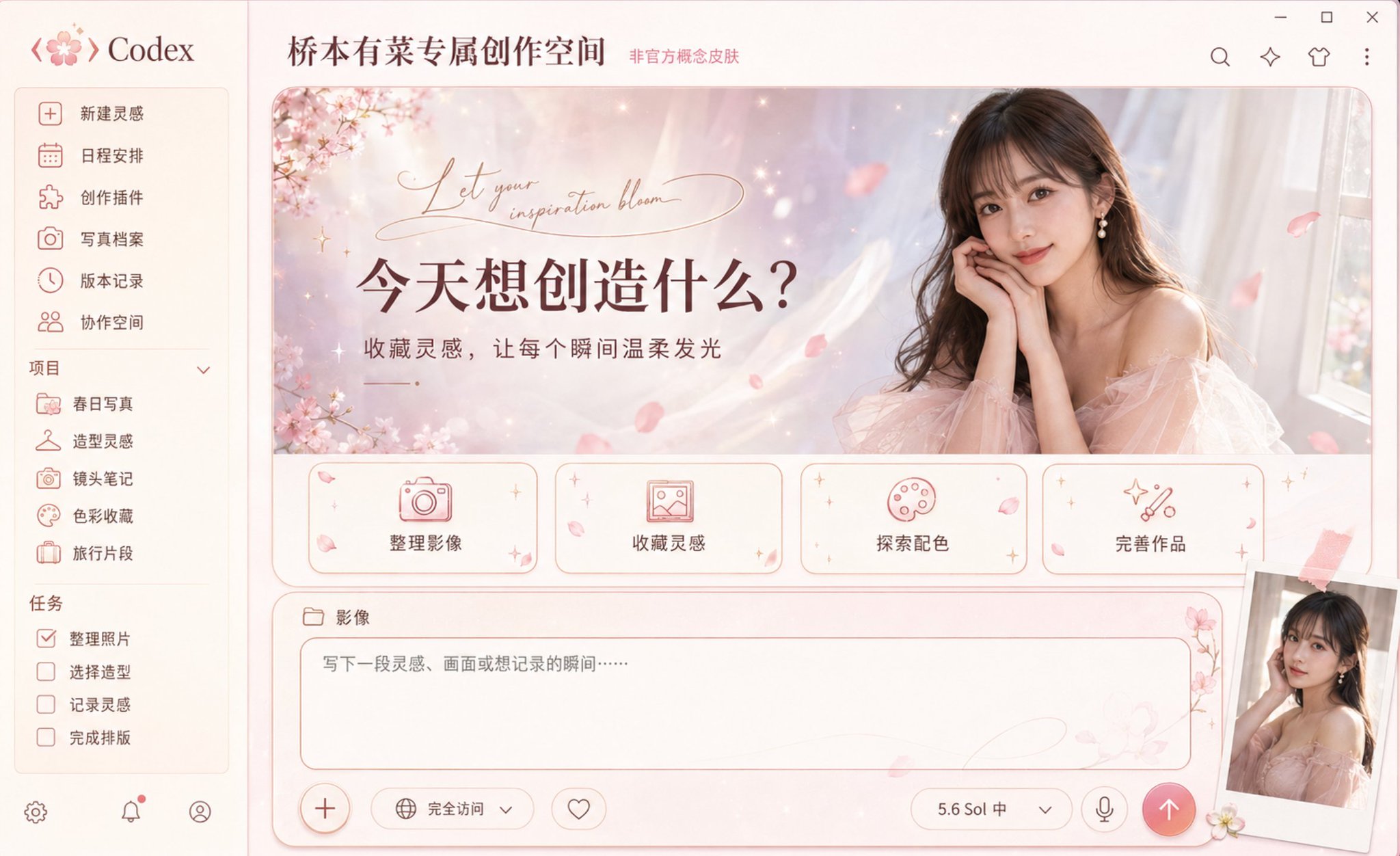
桥本有菜春日樱花Codex皮肤概念图
🤖 ChatGPT
🇺🇸 English Prompt
A high-end Codex desktop application skin concept map with Arina Hashimoto as the character theme, fully displaying the Windows desktop software interface, front eye-level screenshot composition, no perspective tilt. The overall integration of fresh Japanese-style photography, spring cherry blossoms, light luxury fashion magazines, and modern digital creative spaces presents a gentle, bright, exquisite, and romantic but not overly sweet visual temperament; this is an unofficial tribute-style concept design, and official authorization logos do not appear.

The overall color scheme uses cherry blossom pink, cream white, champagne gold, light gray purple, and soft rose brown. Interface materials combine delicate washi paper, translucent tulle, mother-of-pearl, frosted acrylic, and light-colored metal. The background uses soft-focus cherry blossom branches, light pink watercolor smudges, light petals, small starlight, and elegant curves as decorations, paired with the soft natural light of a spring afternoon. All floral elements remain sparse and restrained, highlighting the characters and interface information, without forming a wedding poster or cheap pink sticker style.

A gradient navigation bar of cream white and very light cherry blossom pink is set on the left, with the concise word "Codex" and an abstract icon composed of cherry blossom petals and code brackets displayed at the top. The navigation items are "New Inspiration", "Schedule", "Creation Plugins", "Photo Archives", "Version Records", and "Collaboration Space" in order. The project list below includes "Spring Photos", "Styling Inspiration", "Lens Notes", "Color Collection", and "Travel Snippets", and the task list includes "Organize Photos", "Select Styling", "Record Inspiration", and "Complete Layout". Icons uniformly adopt slender rose gold lines, including cameras, petals, hangers, picture frames, starlight, and folders.

The top of the main content area displays "Arina Hashimoto's Exclusive Creative Space", with "Unofficial Concept Skin" marked in small text next to it. A large horizontal main visual welcome area is set in the center, using soft rounded corners, with the background naturally transitioning from cream white, light pink, and light gray purple, adding tulle light and shadow, bokeh spots, and a small amount of falling petals. The left side retains the title and functional information, and the right side displays a high-quality realistic character portrait of Arina Hashimoto.

The character presents the image of an adult East Asian woman, with recognizable exquisite facial features, black or dark brown long hair, soft bangs, clear natural makeup, and a gentle and confident expression. Wearing a dignified and elegant light pink tulle dress or champagne-colored fashion dress, the neckline and skirt design are appropriate, not exposing, not transparent, paired with small pearl earrings. The character's body is slightly turned toward the camera, hands naturally folded near the chin or lightly supporting the side of the face, the posture is elegant and relaxed, gazing at the camera. Using high-end Japanese fashion magazine photography, soft window light, natural skin texture, delicate hair strands, and shallow depth of field, the character naturally integrates with the interface background.

The left side of the main visual welcome area displays a striking Chinese title "What do you want to create today?", and the subtitle "Collect inspiration, let every moment glow gently". Elegant abstract English handwritten lines are added above the title as decoration, but do not copy real signatures or proprietary wordmarks. The text uses deep rose brown to ensure clear contrast with the light background.

Four cream-white rounded functional cards are arranged horizontally at the bottom of the main visual welcome area, using rose gold fine outlines, light pink icons, and soft shadows. The first card uses a camera icon with the text "Organize Images"; the second uses a picture frame icon with the text "Collect Inspiration"; the third uses a palette icon with the text "Explore Color Matching"; the fourth uses starlight and tool icons with the text "Perfect Works". The cards are uniform in size and evenly spaced, with only a small number of petals and tiny starlight added at the corners, not obscuring the text and icons.

Directly below the main visual welcome area, an independent large horizontal rounded creative panel is set, strictly aligned with the left and right edges of the main content area, close to the full width of the content area, with a height of about one-fourth of the main content area. It must rest stably at the bottom of the page and be a complete, clear, and operable input panel, not a floating chat bubble, narrow search bar, capsule input box, terminal, or independent pop-up window.

The outer background of the creative panel is designed as a gradient from cream white to very light cherry blossom pink according to the character theme, with very subtle washi fibers, pearl soft light, and tulle textures. The edges use slender rose gold outlines and soft light brown pink shadows. The overall color is quieter and less decorated than the main visual welcome area, which is consistent with the Japanese photography and spring cherry blossom themes while keeping the input area clear and legible.

A small folder icon and the partition text "Images" are set in the upper left corner of the outer panel. A wide rounded input area is embedded inside the panel, with clear, slender light rose gold outlines all around, and the internal background is a clean warm cream white, retaining ample white space for writing. The placeholder text is located in the upper left of the input area, content is "Write down an inspiration, a scene, or a moment you want to record...". Only a very light petal watermark and a slender curve are kept in the background of the input area, and decorations cannot enter the main text area.

In the same input panel, a complete bottom control bar is set: on the far left is a circular plus button with a rose gold fine border; next to it are "Full Access" mode controls and a favorite icon; on the right are the model status "5.6 Sol Mid", a down arrow, and a microphone icon; on the far right is a solid circular send button, using a soft rose pink to coral pink gradient, with a clear cream white upward arrow inside. The corners of the panel are only decorated with a small sprig of light pink cherry blossoms, two or three petals, and a small amount of pearl starlight, not obscuring the placeholder text, model selector, or send button.

A slightly tilted vintage Polaroid photo can be stacked in the lower right corner, showing a half-length photo of the character in soft window light, fixed with a short piece of light pink ribbon tape; the photo cannot obscure the important controls of the input panel.

The interface must maintain a real, complete, and operable desktop application structure, rather than a character promotional poster. The character occupies about one-third of the right side of the main visual welcome area, and the left title, four functional cards, and the bottom input panel are clear and complete. Using high-end commercial UI/UX design, precise grids, clear visual hierarchy, loose white space, uniform rounded corners, delicate outlines, restrained shadows, real materials, and Japanese magazine-level color grading. All specified Chinese text is clearly discernible and presents short texts such as "New Inspiration", "Schedule", "Photo Archives", "What do you want to create today?", "Organize Images", "Collect Inspiration", "Explore Color Matching", "Perfect Works", and "Images" as accurately as possible. Ultra-high detail, 4K product display quality, complete window borders, without cropping any important components.

Aspect ratio 16:10

Negative constraints: low resolution, blurred, pixelated, over-sharpened, overexposed, over-saturated colors, cheap pink filters, gaudy studio style, wedding poster style, cartoon idol style, excessive roses, heart stickers, piled up petals, cluttered background, messy interface hierarchy, misaligned components, cropped window, severe perspective distortion, repeated cards, repeated characters, overlapping text, garbled Chinese, random English letters, wrong menu text, bottom input box size too small, input box becomes narrow search bar, capsule-shaped input box, floating chat bubble, input panel detached from the page, input panel becomes terminal or pop-up, missing outer large panel, missing inner input outline, missing bottom control bar, missing circular plus or send button, input area filled with floral decorations, input box uses pure black smoked glass, sexual hints, nude clothing, transparent clothing, lingerie styling, suggestive poses, character face drift, wrong hairstyle, wrong age performance, exaggerated expressions, waxy feeling, plastic skin, wrong body proportions, hand deformities, extra fingers, extra arms, fused fingers, hard edges between character and background, copying real signatures, forging official logos, presenting as official cooperation or officially authorized product, watermark.
🇨🇳 中文提示词
一张以桥本有菜为人物主题的高端 Codex 桌面应用皮肤概念图,完整展示 Windows 桌面软件界面,正面平视截图构图,无透视倾斜。整体融合清新日系写真、春日樱花、轻奢时尚杂志与现代数字创作空间,呈现温柔、明亮、精致、浪漫但不过度甜腻的视觉气质;这是非官方致敬型概念设计,不出现官方授权标识。

整体采用樱花粉、奶油白、香槟金、浅灰紫和柔和玫瑰棕配色。界面材质结合细腻和纸、半透明薄纱、珍珠母贝、磨砂亚克力与浅色金属。背景使用柔焦樱花枝、淡粉水彩晕染、轻盈花瓣、细小星光和优雅曲线作为装饰,搭配春日下午的柔和自然光。所有花卉元素保持疏朗克制,重点突出人物和界面信息,不形成婚礼海报或廉价粉色贴纸风格。

左侧设置奶油白与极浅樱花粉渐变导航栏,顶部显示简洁的“Codex”字样以及由樱花花瓣和代码括号组成的抽象图标。导航项目依次为“新建灵感”“日程安排”“创作插件”“写真档案”“版本记录”“协作空间”。下方项目列表包括“春日写真”“造型灵感”“镜头笔记”“色彩收藏”“旅行片段”,任务列表包括“整理照片”“选择造型”“记录灵感”“完成排版”。图标统一采用纤细玫瑰金线条,包含相机、花瓣、衣架、画框、星光和文件夹。

主内容区顶部显示“桥本有菜专属创作空间”,旁边以小号文字标注“非官方概念皮肤”。中央设置大型横向主视觉欢迎区域,使用柔和圆角,背景由奶油白、浅粉和淡灰紫自然过渡,加入薄纱光影、散景光斑与少量飘落花瓣。左侧保留标题和功能信息,右侧展示桥本有菜的高品质写实人物肖像。

人物呈现成年东亚女性形象,具有可识别的精致面部特征、黑色或深棕色长发、柔和刘海、清透自然妆容和温柔自信的神情。身穿端庄优雅的浅粉色薄纱礼服或香槟色时尚连衣裙,领口与裙身设计得体,不暴露、不透明,搭配小巧珍珠耳饰。人物身体微微侧向镜头,双手自然交叠靠近下颌或轻扶脸侧,姿态优雅放松,凝视镜头。采用高端日系时尚杂志摄影、柔和窗边光、自然皮肤纹理、细腻发丝和浅景深,人物与界面背景自然融合。

主视觉欢迎区域左侧显示醒目中文标题“今天想创造什么?”,副标题“收藏灵感,让每个瞬间温柔发光”。标题上方加入优雅的抽象英文手写线条作为装饰,但不复制真实签名或专有字标。文字使用深玫瑰棕色,保证与浅色背景之间具有清晰对比。

主视觉欢迎区域下部横向排列四张奶油白圆角功能卡片,使用玫瑰金细描边、浅粉图标和柔和阴影。第一张使用相机图标,文字“整理影像”;第二张使用画框图标,文字“收藏灵感”;第三张使用调色盘图标,文字“探索配色”;第四张使用星光与工具图标,文字“完善作品”。卡片尺寸统一、间距均匀,仅在边角加入少量花瓣和细小星光,不遮挡文字与图标。

主视觉欢迎区域正下方设置一个独立的大型横向圆角创作面板,与主内容区左右边缘严格对齐,接近内容区全宽,高度约占主内容区域的四分之一。它必须稳定落在页面底部,是完整、清晰、可操作的输入面板,不是悬浮聊天气泡、狭窄搜索栏、胶囊输入框、终端或独立弹窗。

创作面板外层背景根据人物主题设计为奶油白至极浅樱花粉渐变,带有非常细微的和纸纤维、珍珠柔光和薄纱纹理。边缘使用纤细玫瑰金描边与柔和浅棕粉阴影。整体颜色比主视觉欢迎区域更安静、装饰更少,既与日系写真和春日樱花主题一致,又保持输入区域清晰易读。

外层面板左上角设置小型文件夹图标和分区文字“影像”。面板内部嵌入一个宽大的圆角输入区域,四周具有清晰、纤细的浅玫瑰金描边,内部背景为干净的暖奶油白,保留充足空白书写空间。占位文字位于输入区域左上方,内容为“写下一段灵感、画面或想记录的瞬间……”。输入区背景只保留极淡的花瓣水印和一条纤细曲线,装饰不能进入主要文字区域。

在同一个输入面板内部设置完整的底部控制栏:最左侧是带玫瑰金细边框的圆形加号按钮;旁边依次是“完全访问”模式控制和收藏图标;右侧依次放置模型状态“5.6 Sol 中”、下拉箭头和麦克风图标;最右端设置一个实心圆形发送按钮,采用柔和玫瑰粉至珊瑚粉渐变,内部为清晰的奶油白向上箭头。面板边角仅点缀一小枝淡粉樱花、两三片花瓣和少量珍珠星光,不遮挡占位文字、模型选择器或发送按钮。

右下角可以叠放一张略微倾斜的复古拍立得照片,内容为人物在柔和窗光中的半身写真,使用一小段浅粉色丝带胶带固定;照片不能遮挡输入面板的重要控件。

界面必须保持真实、完整、可操作的桌面应用结构,而不是人物宣传海报。人物约占主视觉欢迎区域右侧三分之一,左侧标题、四张功能卡片和底部输入面板清晰完整。采用高级商业UI/UX设计、精确网格、明确视觉层级、宽松留白、统一圆角、细腻描边、克制阴影、真实材质和日系杂志级色彩分级。所有指定中文清晰可辨,并尽可能准确呈现“新建灵感”“日程安排”“写真档案”“今天想创造什么?”“整理影像”“收藏灵感”“探索配色”“完善作品”“影像”等短文本。超高细节,4K产品展示品质,完整窗口边界,不裁切任何重要组件。

宽高比 16:10

负面约束:低清晰度,模糊,像素化,过度锐化,过度曝光,颜色过饱和,廉价粉色滤镜,俗艳影楼风,婚礼海报风,卡通偶像画风,过量玫瑰,爱心贴纸,花瓣堆砌,杂乱背景,界面层级混乱,组件错位,窗口被裁切,严重透视畸变,重复卡片,重复人物,文字重叠,乱码中文,随机英文字母,错误菜单文字,底部输入框尺寸过小,输入框变成狭窄搜索栏,胶囊形输入框,悬浮聊天气泡,输入面板脱离页面,输入面板变成终端或弹窗,缺少外层大面板,缺少内层输入描边,缺少底部控制栏,缺少圆形加号或发送按钮,输入区域被花卉装饰占满,输入框使用纯黑烟雾玻璃,色情暗示,裸露服装,透明服装,内衣造型,挑逗姿势,人物脸部漂移,错误发型,错误年龄表现,夸张表情,蜡像感,塑料皮肤,身体比例错误,手部畸形,多余手指,多余手臂,手指融合,人物与背景边缘生硬,复制真实签名,伪造官方Logo,呈现为官方合作或官方授权产品,水印。
发表回复